
Find the matching autoimmune disease regimen
After you specify the patient, you must find the evidence-based regimen that most closely matches the physician's prescribed treatment.
Enter all drugs that the patient will receive during treatment; even the ones that don't need to be preauthorized.
-
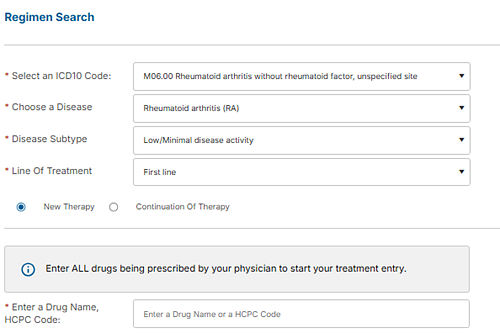
On the Regimen Search screen, provide
the disease and treatment details.
-
In the Enter a Drug
Name, HCPC Code box, type the HCPC code or brand or generic drug
name that the physician prescribed. As you type, the system displays a list of
matching entries. Choose the correct drug from the list.
As you enter the codes, the system displays them in the Drugs list.
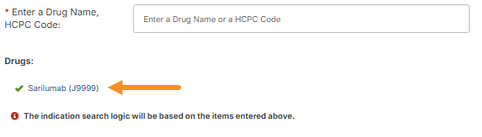
After you choose each drug, the green circle in the upper-right corner of the screen displays the number of regimens that include only your currently selected drug or drugs.
-
Continue adding the drugs until the list of drugs matches
what the physician prescribed.
Note:To remove a drug that you mistakenly added, point to the drug name in the list. The drug name appears in red with a red x mark (
 ) next to it. Click the drug name to remove it.
 -
Click Save and
Continue.
Eviti searches for evidence-based regimens. We may ask you some questions to shorten the list of matching regimens.
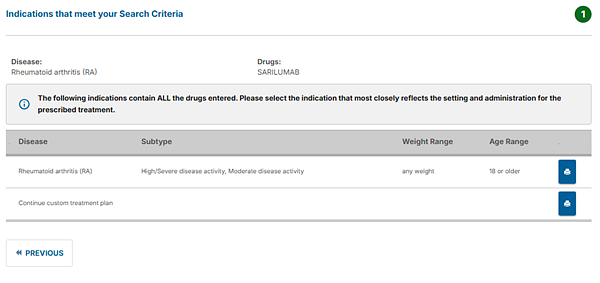
The matching regimens appear:
-
Review the results of the regimen search.
- If no regimens match the drugs that you entered, the Build Treatment Plan screen appears with your list of drugs.
-
If Eviti finds multiple regimens, find the regimen that most closely matches the prescribed treatment, and then click the row to select it. Click the Print icon (
 ) to view an entire regimen. If you see too many choices
and want to review or update your responses to narrow the list,
click Previous.
) to view an entire regimen. If you see too many choices
and want to review or update your responses to narrow the list,
click Previous. - If you determine that none of regimens in the list match your treatment plan, click Continue custom treatment plan to create a custom one.
If we don't find a regimen, either your physician's treatment is outside standard of care, or the drug list that you entered is incorrect (for example, you chose the wrong drug, or you forgot to enter a drug).
Click Previous at any time to review or update the drug list or your responses to the treatment plan questions.
The next step is to verify the drug details in your selected regimen, or enter them if the system didn't find a matching regimen.