
Register for Eviti Connect
To register for Eviti Connect, you need your facility's federal tax identifier (TIN) and business name, and the provider's individual NPI number. If you're part of a practice, you need the NPIs for all the providers in your practice. NPIs must belong to a medical oncologist, a radiation oncologist, or an autoimmune specialist.
-
Go to Eviti Connect.
The following screen appears:
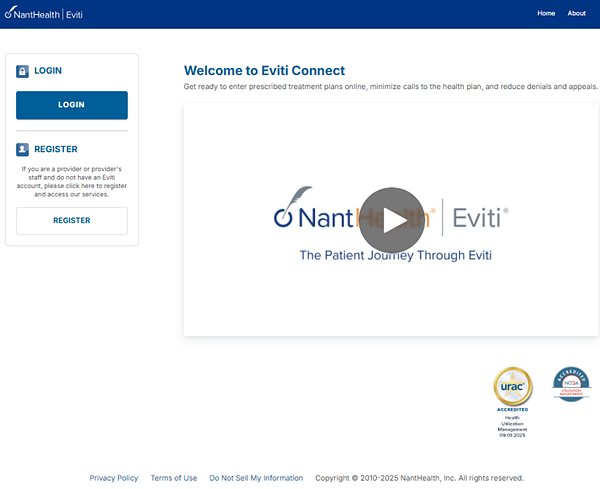
- On the left side of the screen, click Register.
- On the next screen, click Start Eviti Registration.
-
Fill in the requested information on all four screens.
Click Continue after you
complete each screen.
- User Registration (Step 1 of 4): Provide your email address and create a password.
- User Registration (Step 2 of 4): Choose two questions from the Security Question menus and provide your answers. Your answers to these questions will help you access your account if you forget your password.
- User Registration (Step 3 of 4): Choose your account type. Choose whether you're a doctor, part of a doctor's administrative team, or a clinical staff member at a doctor's practice.
- User Registration (Step 4 of 4): Provide your contact information and IDs. If you choose I am a doctor, we display your contact information after you type your NPI. Enter individual NPI numbers; do not enter group NPI numbers. To enter multiple tax IDs or NPIs, enter each one, one at a time, and then click Add.
When you add an NPI, you must choose whether the NPI is for a medical oncologist (for chemotherapy), a radiation oncologist, or an autoimmune specialist. If they prescribe multiple types of treatment plans, for example, a urologist, you must choose one NPI type during registration. To change the value later, contact NantHealth Support at 1-888-482-8057.
-
Click Complete.
The Registration Complete screen appears. Click Click Here to Login to Eviti to enter a treatment plan.